Professional Excel Model · CHF 399

The most complete accounting-to-cash-flow model you can build in Excel.
Both methods. Full reconciliation. End-to-end.

14 interconnected worksheets. 57,000+ transaction rows. Journal entries flow automatically into the income statement, balance sheet, and both direct and indirect cash flow statements with built-in reconciliation proving they match. Built from 15 years of corporate controlling at Dufry Group and Bomi (UPS Group).

What you get
Complete Excel workbook (14 worksheets, all formulas unlocked)
Both direct and indirect cash flow with reconciliation proving they match
IFRS 16 right-of-use assets and lease liabilities integrated
Two process flow diagrams (A3-ready, printable)
Structural guide explaining model architecture and adaptation path
Free updates for 12 months and direct email support
CHF 399 one-time
If it doesn't work as described, I'll fix it or refund you.
Inside the Model

See exactly what you're buying.

Every worksheet shown here is from the actual file. No mockups.

Direct vs Indirect Cash Flow reconciliation summary showing 0.00 variance across all 12 months
Summary: Direct vs Indirect Cash Flow

The reconciliation worksheet proves both methods match across all 12 months, broken down by operational, investment, and financing activities. Every check row reads 0.00. This is the single most important worksheet in the model.
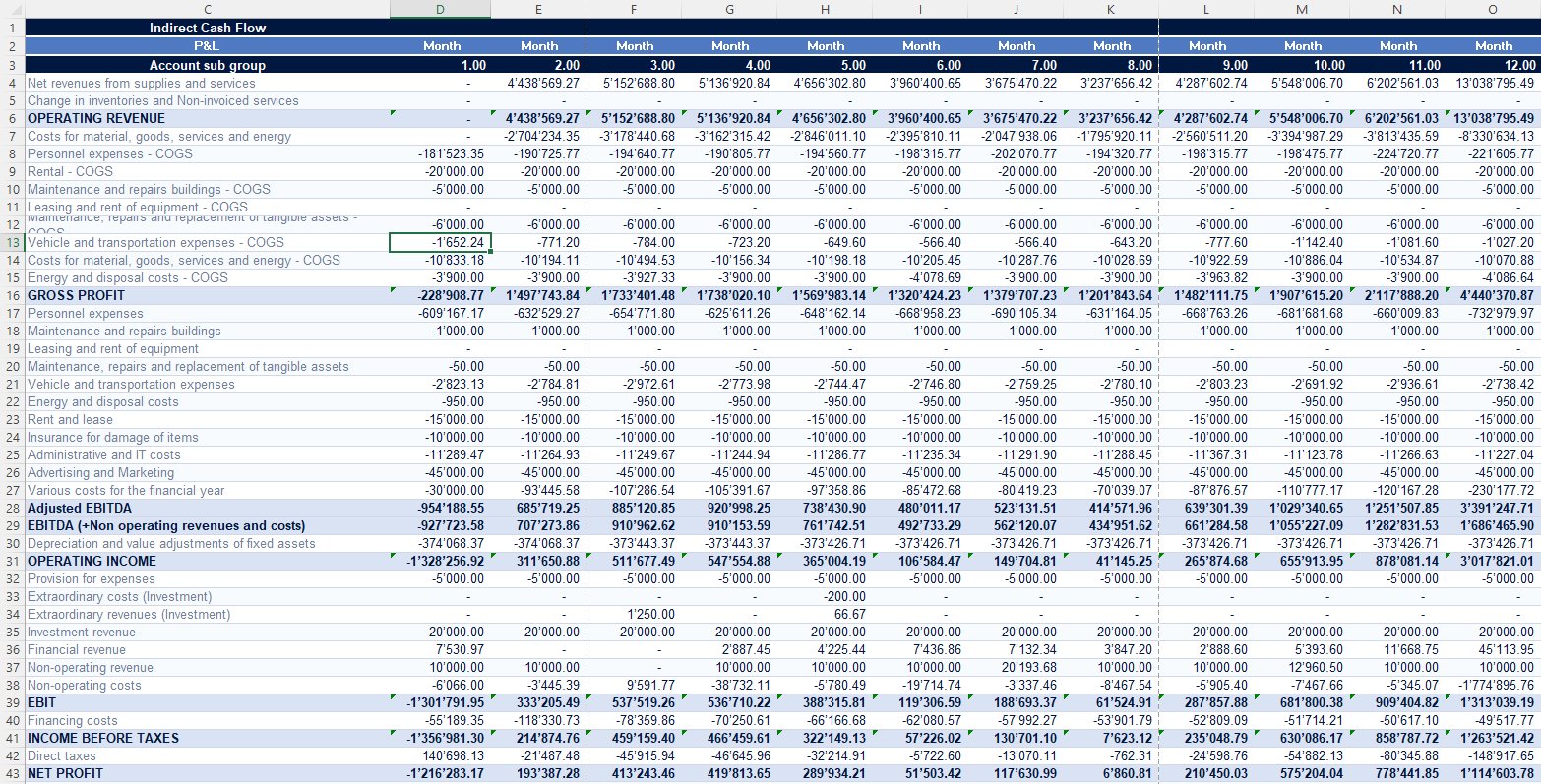
P&L income statement with COGS, OPEX, EBITDA, and Net Profit across 12 months
Income Statement

Full P&L with COGS and OPEX separated throughout. Six profitability subtotals: Gross Profit, Adjusted EBITDA, EBITDA, Operating Income, EBIT, and Net Profit. Flows automatically from journal entries, updated every month.
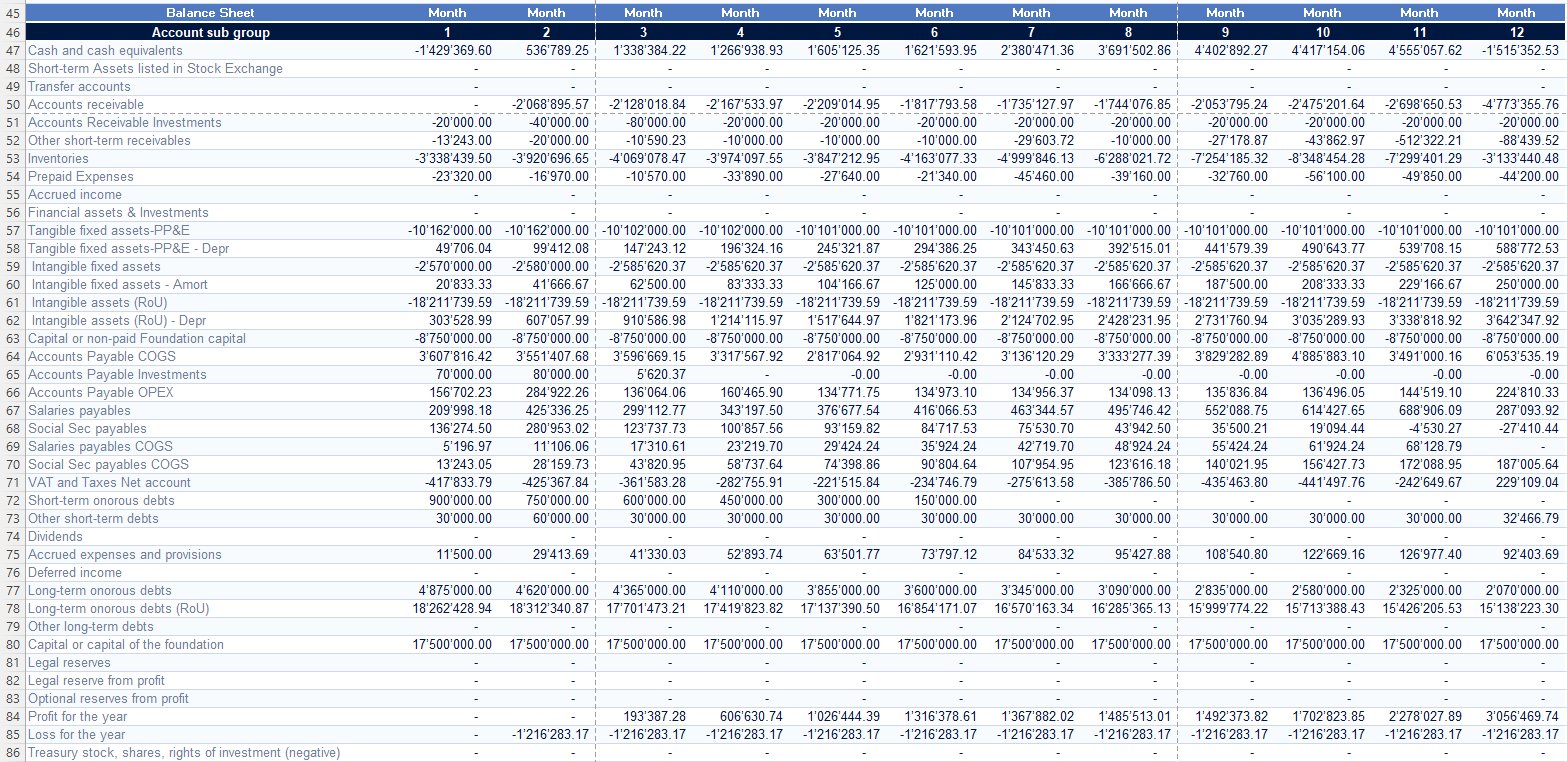
Full 12-month balance sheet with assets, liabilities, and equity
Balance Sheet (12 months)

Complete balance sheet updated monthly. Includes right-of-use assets and lease liabilities (IFRS 16), separate payables for COGS, OPEX, and investments, and full equity section with retained earnings tracking.
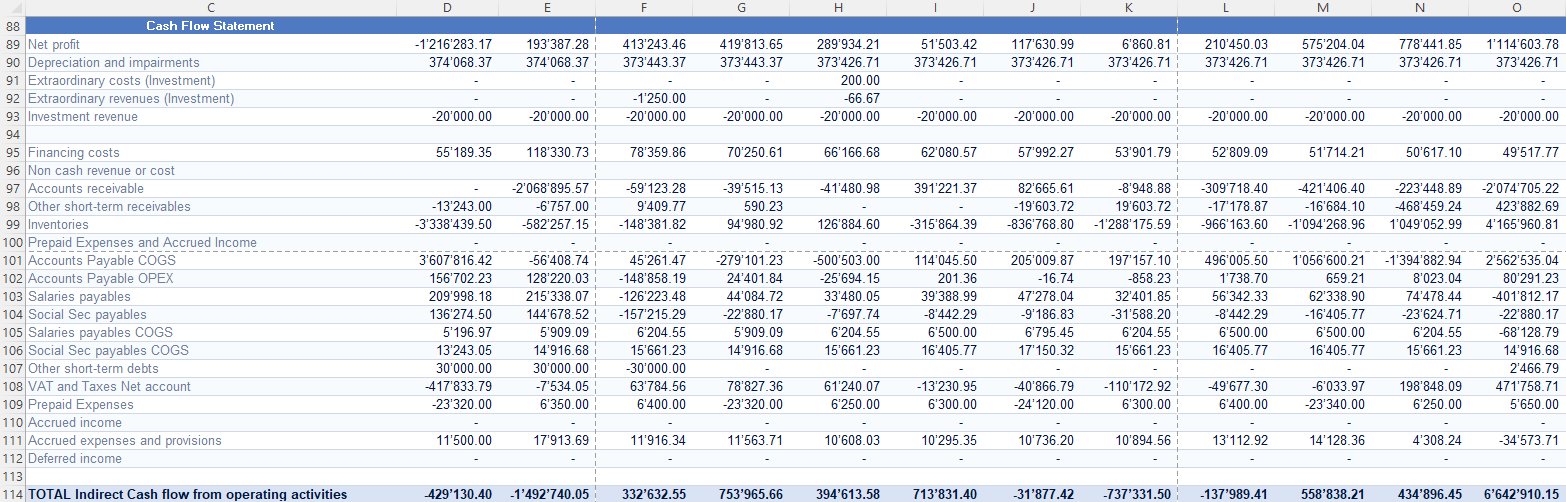
Indirect cash flow from operating activities across 12 months
Indirect Cash Flow: Operating Activities

Net profit adjusted for non-cash items: depreciation, working capital movements, inventory changes, payables, receivables, accruals. Every line sourced directly from the balance sheet and P&L. Nothing is manual.
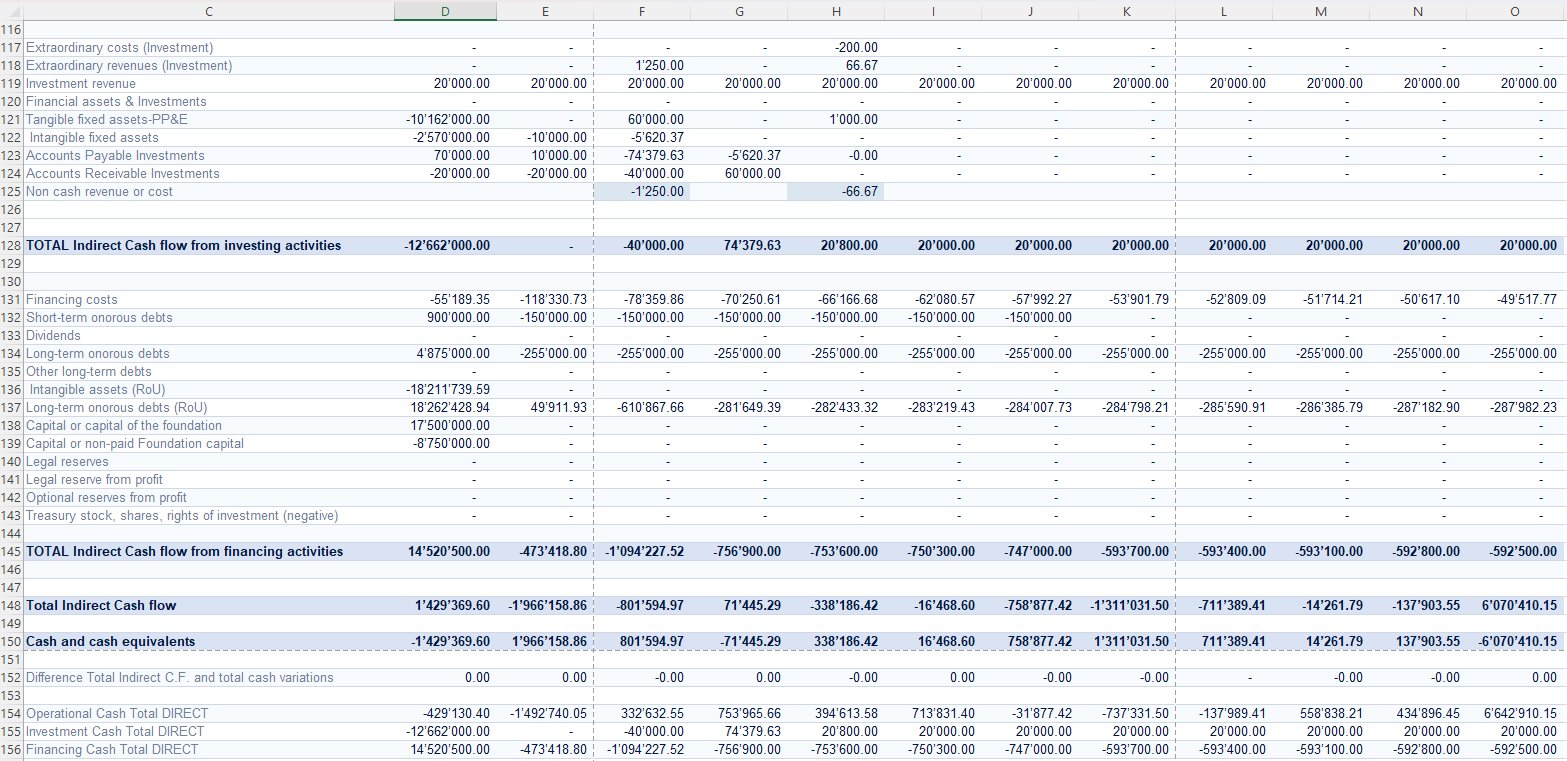
Indirect cash flow from investing and financing activities
Indirect Cash Flow: Investing and Financing Activities

Capital expenditure, intangible assets, long-term debt movements, IFRS 16 lease liabilities, dividends, and equity changes. Fully integrated with the balance sheet so every movement is traceable.
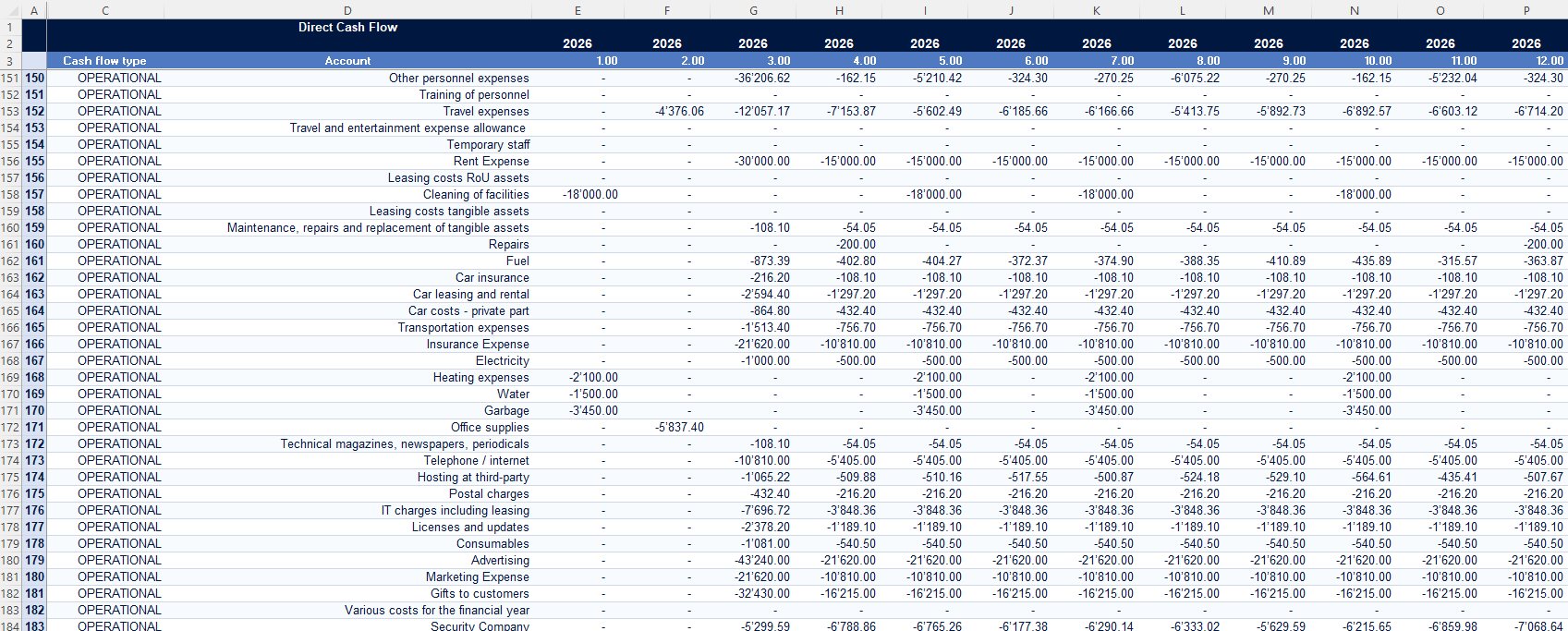
Direct Cash Flow statement showing every cash movement by account across 12 months
Direct Cash Flow Statement

Every actual cash movement classified by type (operational, investment, financing) at individual account level across all 12 months. Built directly from journal entries, not derived from the P&L. Shows exactly which expenses consumed cash and when: the granularity the indirect method abstracts away. Reconciles automatically to the indirect method with zero variance.
Why This Exists

You've built cash flow models before. Not like this one.

If you're a controller or CFO, you've probably built or inherited dozens of financial models in Excel. Some work. Most are held together with manual overrides, broken links, and formulas nobody dares touch.

This model is different. It's the end-to-end financial cycle in a single file: journal entries flowing through to a full P&L, balance sheet, and both direct and indirect cash flow statements automatically, with zero manual adjustments. Change a journal entry and watch the impact cascade through every statement.

It also bridges the gap that most models ignore: the space between accounting (journal entries, ledgers, trial balance) and controlling (COGS calculation, inventory movements, cost center allocation, profitability subtotals). That bridge is where controllers actually live, and where most Excel models fall apart.

I built this from 15 years of running controlling operations at Dufry Group and Bomi (UPS Group). Every worksheet, every flow, every reconciliation mirrors how I actually structured reporting in a multi-million CHF operation.

Who It's For

Built for finance professionals who already know the fundamentals.

This is not an introductory accounting tool. It assumes you understand double-entry bookkeeping, can read financial statements, and know the difference between direct and indirect cash flow methods. What it gives you is something harder to find: a complete, working reference model that does the full cycle properly.

Controllers

Building or rebuilding your reporting stack

If you're setting up financial reporting from scratch or inheriting a mess, this gives you a proven structure to work from. Chart of accounts, P&L layout, balance sheet groupings, cash flow reconciliation logic. Adapt it and have a professional reporting framework in days, not months.

CFOs

Who need a parallel model

Your ERP produces reports, but can you trace a single transaction from journal entry through to its cash flow impact? This model lets you build that visibility outside the ERP, for validation, for scenario testing, or for when the system output doesn't add up and you need to find out why.

Finance Leaders

Designing chart of accounts or reporting structures

Before you configure your ERP, prototype it here. Test whether your account structure supports the profitability subtotals you need. Verify that your cash flow statement will reconcile. Cheaper to find structural problems in Excel than in SAP.

Audit Prep

Preparing for audits or due diligence

The direct-vs-indirect reconciliation, the built-in balance checks, the full trail from journal entry to financial statement: this is the level of documentation and traceability that auditors want to see. Use this as a reference for how your own reporting should work.

ERP Evaluation

Evaluating ERP reporting capabilities

If you're comparing what your ERP can produce against what a properly structured financial model should produce, this is your benchmark. If your ERP can't do what this Excel file does, you have a configuration problem.

CHF 399
One-time purchase. Fully unlocked.
Buy Now
How To Use It

Three ways professionals use this model.

01

As a reporting framework to adapt.

Map the chart of accounts to your organization. Replace the sample journal entries with your actual data: feed journal entries directly, import bank statement data, or pass in your existing income statement and balance sheet figures. The formulas do the rest. You'll have a complete set of financial statements including fully reconciled cash flow within hours.

02

As a parallel validation model.

Run your ERP output alongside this model. Feed the same data into both. If the cash flow statements don't match, one of you has a structural problem: and this model makes it easy to find where the discrepancy originates, because every number traces back to a journal entry.

03

As a design prototype.

Before committing to a new chart of accounts, reporting structure, or cash flow methodology in your ERP, build it here first. Test the account groupings, verify the cash flow reconciliation logic, check whether your profitability subtotals (Gross Profit, EBITDA, Operating Income, EBIT) work with your cost structure. Iterate in Excel, then implement in your system with confidence.

What Makes This Different

What you won't find in any other Excel model at any price.

Most financial models solve one part of the problem. This one solves all of it.

End-to-end: journal entries to P&L to balance sheet to cash flow.

Not a reporting template. Not a budget model. A complete accounting cycle that produces all three financial statements from a single data source. Change one entry, see the impact everywhere.

Both direct AND indirect cash flow methods with reconciliation.

The summary worksheet proves they match across all 12 months, broken down by operational, investment, and financing activities. 0.00 variance, every period. This is the level of rigor a Big Four audit team expects, and almost nobody builds in Excel.

The accounting-to-controlling bridge.

COGS vs. OPEX separation throughout the P&L and balance sheet. Inventory movements (raw materials to finished goods). Separate payables tracking for COGS, OPEX, and investment. Six profitability subtotals. This model doesn't just close the books: it produces the management reporting a controller needs to run the business.

IFRS 16 built in.

Right-of-use assets, lease liabilities, and their depreciation/amortization flow through the balance sheet and cash flow statement. Not bolted on as an afterthought: integrated into the core model structure.

Process flow diagrams.

Two detailed diagrams mapping every transaction type (operational, investment, and financing) from source document to cash flow impact. A powerful tool for explaining your reporting logic to auditors, boards, or new team members.

Built from real corporate operations.

This structure comes from 15 years of controlling at Dufry Group and Bomi (UPS Group), not from a textbook. Every design choice reflects what actually works under pressure, with real deadlines and real auditors.

Process Flow Diagrams

The visual logic behind the model.

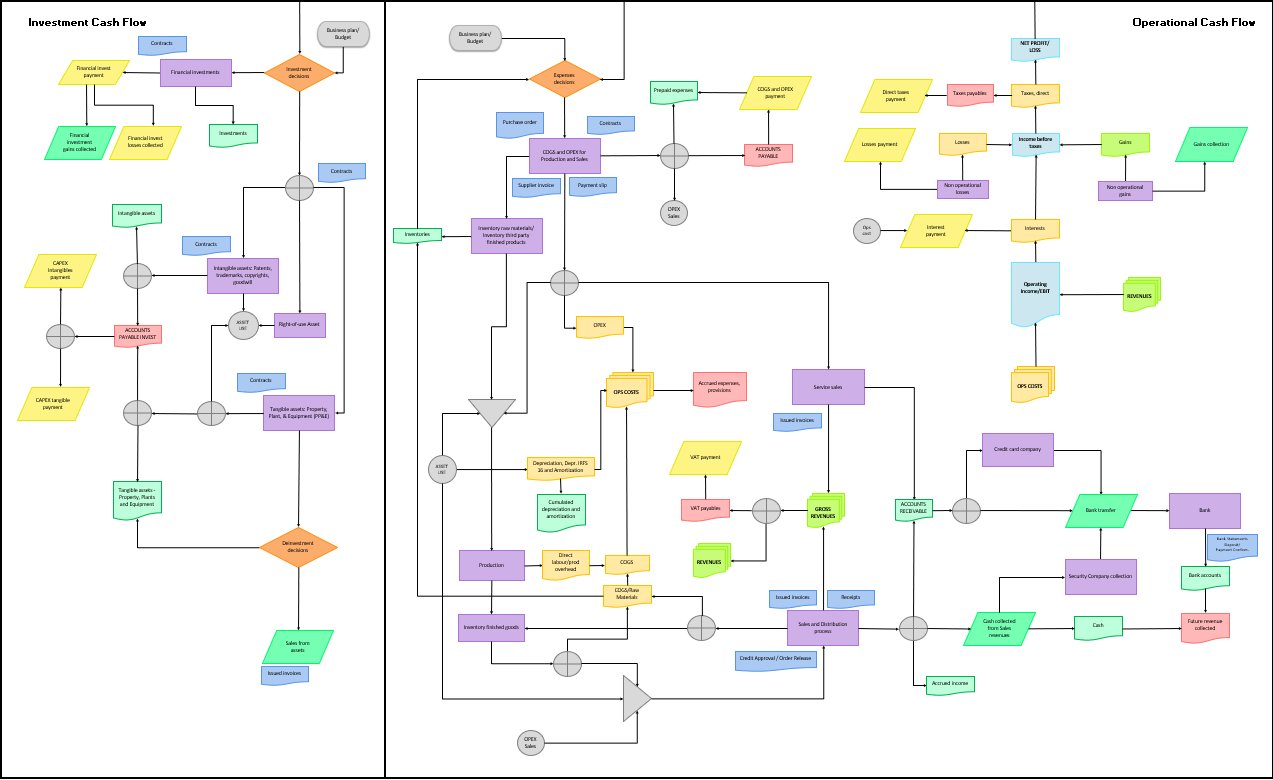
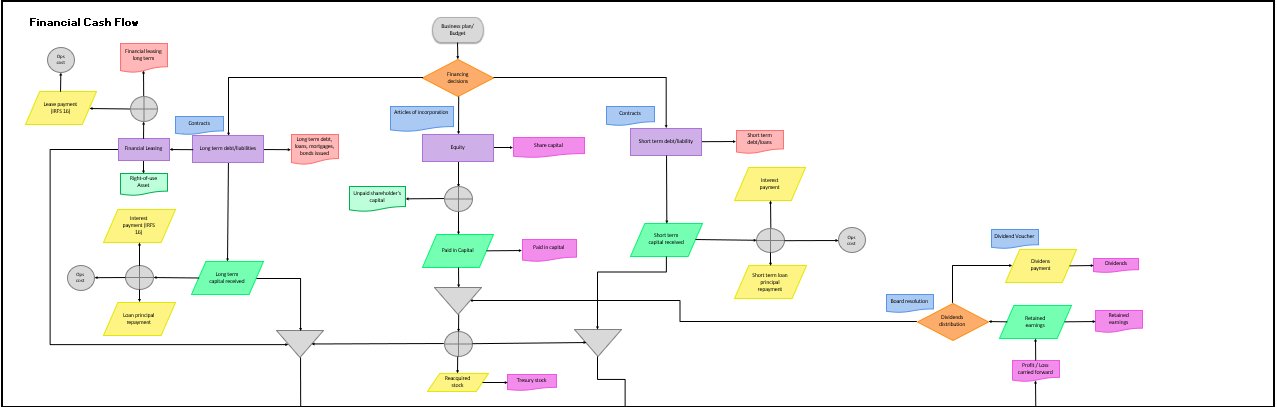
Two A3-ready diagrams included with every purchase. They map every transaction type from source document to cash flow impact. Use them to explain your reporting logic to auditors, boards, or new team members.

Investment and Operational Cash Flow process flow diagram
Diagram 1: Investment and Operational Cash Flow

Maps every operational transaction from purchase order through to accounts payable, inventory movements, COGS, and revenue collection. The investment side covers CAPEX, intangible assets, PP&E, and divestment decisions. Every node traces to a specific journal entry in the model.

Financial Cash Flow process flow diagram
Diagram 2: Financial Cash Flow

Covers all financing decisions: long-term debt and loans, equity issuance and treasury stock, short-term borrowings, IFRS 16 lease liabilities, interest payments, dividends, and retained earnings. Includes the full IFRS 16 treatment from lease contract through to right-of-use asset and cash flow impact.

Pricing

The complete financial cycle in one file. CHF 399.

CHF 399 one-time
Complete Excel workbook (14 worksheets, 57,000+ transactions, all formulas unlocked)
Both process flow diagrams (printable, A3-ready)
Structural guide explaining model architecture and adaptation path
Free updates for 12 months
Direct email support from the person who built it
Buy Now If it doesn't work as described, I'll fix it or refund you. No questions.
The alternative math
Controller to build this from scratch (40 to 80 hours at CHF 150 to 200/hour) CHF 6,000 to 16,000
Financial modeling firm CHF 5,000 to 15,000
Discovering your ERP cash flow doesn't reconcile during an audit Priceless
This model, ready to adapt CHF 399
FAQ

Common questions.

Excel 2016 or later (Windows or Mac). Some advanced formulas may have limited functionality in Google Sheets.
Fully unlocked. Change the chart of accounts, add accounts, modify formulas, restructure the P&L layout: everything is yours.
The chart of accounts and financial statement layout follow Swiss Obligationenrecht conventions, but the model logic is universal. It works for IFRS, local GAAP, or any double-entry system. You map the chart of accounts to your standard: the formulas handle the rest.
Yes. Many controllers use this as a parallel reporting model, a validation tool, or a prototype for their ERP configuration. It's not a replacement for transaction-level accounting software for daily processing, but it works as a financial reporting and analysis framework alongside your ERP.
For an experienced controller: map the chart of accounts (2 to 4 hours), configure your cost structure (1 to 2 hours), feed your data (varies). Most professionals have a working model within a day.
Yes. Contact me at [email protected] for multi-seat pricing.
Yes: that's exactly what I do as a controller. If you need hands-on help configuring this model for your business, we can discuss a project engagement. Book a call →
Get the Model

Stop rebuilding financial models from scratch.

Buy Now — CHF 399 Download sample worksheet →
Need help adapting it? Book a consulting call →